
Maintaining a rigorous SE Michigan Insurance IT Checklist ensures your agency stays ahead of both physical wear and regulatory scrutiny. This month, our focus shifts to the Hardware Clean, a critical preventative measure designed to protect your “growth engine” from the silent risks of overheating and equipment fatigue. By auditing everything from server airflow to battery health now, you transform potential compliance headaches into a reliable, high-performance environment that keeps your firm billable and secure through the busiest seasons.
1. Clean out your devices (physically)
Blow out dust from servers, workstations, and network switches using compressed air or a electronic blower. Dust buildup is a silent killer that causes thermal throttling—essentially putting a “speed limit” on your firm’s growth.
SE Michigan Insurance IT Checklist Recommendation

I recommend this over a dispensable can. Costs less than a 6 pack of compressed air and will last for years. Many uses at Home and Office!
2. Inventory
Physically locate every piece of hardware on your list. If a laptop is missing, it’s not just “lost hardware”—it’s a potential compliance breach that needs to be reported immediately to avoid those heavy fines we discussed.
3. Check Batteries For EOL
Check every UPS (Uninterruptible Power Supply) and laptop for “pillowing” or swollen batteries. For an insurance agency, an old battery isn’t just a tech failure; it’s a fire hazard and a data loss risk during a power surge.
SE Michigan Insurance IT Checklist Recommendation

This is my Go-To UPS. More than enough power to last giving you time to turn off your electronics during an outage. More than pays for itself.
4. Peripheral Sanitization
It’s always a good thing to more than once a year, but a deep clean is also very important. Clean keyboards, mice, and desk phones with electronics-safe wipes. This sounds like “office cleaning,” but reducing staff illness during peak seasons (like tax season for CPAs) is a key part of maintaining a high-performance engine.
5. Server Room Temperature Check
Verify that your cooling system is maintaining an optimal environment. High heat degrades hardware 2x faster, leading to premature (and expensive) capital expenditures.
SE Michigan Insurance IT Checklist Recommendation

Short of the manual “walk in and feel it”. This can be added to the security of your equipment. Insurance underwriters love it for covering downtime.
Why Physical Maintenance Matters
A “streamlined engine” can’t run on dusty, neglected hardware. As you can see in this SE Michigan Insurance IT Checklist for SE Michigan agencies, a single hardware failure during a peak renewal period can result in thousands of dollars in lost billables and significant client frustration. This mid-month check focuses on the physical components—like UPS battery health and internal cooling systems—that often go unnoticed until they fail. By proactively managing these assets, you reduce the risk of catastrophic data loss and extend the overall lifespan of your technology investments.

6. Storage Health Diagnostics
Run diagnostic software to check for “Bad Sectors” on physical hard drives. Finding a failing drive before it crashes is the difference between a 10-minute swap and a 48-hour data recovery nightmare.
7. Cable Management & Integrity
Identify and replace frayed power cables or pinched Ethernet lines. A “rat’s nest” of cables isn’t just messy; it causes heat pockets and makes it impossible for an onsite tech to troubleshoot quickly during an emergency.
SE Michigan Insurance IT Checklist Recommendation

This role of Velcro will save you many quarters in the swear jar compared to zip ties. #banzipties4life
8 Screen & Lens Calibration
Clean laptop screens and, more importantly, webcam lenses. High-end professional services are now conducted over Zoom; a blurry, smudged camera makes a $500/hour lawyer look like an amateur.
9. Port Inspection
Vacuum out USB, Thunderbolt, and Power ports on all laptops. These are high-fail points for mobile professionals who are constantly plugging in at courtrooms or client offices.\
SE Michigan Insurance IT Checklist Recommendation
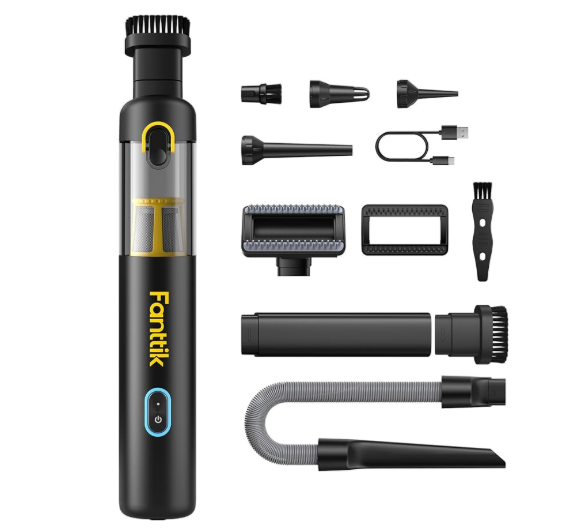
Be sure to vacuum and not blow out. Using a mini blower will push dirt and debris deeper into the ports. We love this for work, car, home, etc.
10. UPS Load Testing
Briefly unplug your battery backups to ensure they actually hold the load for the rated time. There is nothing worse than thinking you’re protected during a Detroit storm, only for the power to cut instantly because the battery was “dead on its feet.”
SE Michigan Insurance IT Checklist Recommendation
This is my Go-To UPS. More than enough power to last giving you time to turn off your electronics during an outage. More than pays for itself.

4. What can a competent MSP do for you?
Trying to manage this in-house is increasingly impossible for mid-market firms. An MSP provides the “compliance-as-a-service” layer you need:
| Requirement | How We Solve It |
| Audit Readiness | We provide real-time dashboards and logs that are “auditor-ready” at a moment’s notice. |
| Vendor Risk Management | We vet your third-party software (SaaS) to ensure they meet the same high standards you do. |
| Incident Response | We provide the 24/7 monitoring and the formal “Incident Playbook” required by law. |
| Regulatory Mapping | We map your IT controls directly to frameworks like GLBA, NYDFS, or CMMC. |
The Bottom Line
Compliance is not a destination; it is a pulse. If your technology isn’t being monitored, patched, and audited in real-time, you are falling behind the regulatory curve.
Is your current IT setup ready for a surprise SEC or FINRA audit tomorrow?
We Can Help

Book your non intrusive evaluation today so we can help you find the gaps your company needs to patch